Authentication test
Every request to the QI DTVM APIs carries two headers:
API-CLIENT-KEY: your integration's API key.AUTHORIZATION: a JWT signed with your private key. QI validates the signature with the public key you registered in the key exchange.
This page builds both headers in Python and calls /authentication_test, which only responds 200 when host, API key and signature are correct. Run this test before any other call.
1. Choose your profile's base URL
This is the most common error on the first call: copying the example with another profile's host.
Each profile has its own host. An API key is only recognized on the host of the profile it was issued for: a manager's key sent to the assignor host is rejected as Invalid API Key, even with a correct signature.
| Your profile | Sandbox | Production |
|---|---|---|
| Manager (fund manager) | https://manager-api.sandbox.qidtvm.com.br | https://manager-api.qidtvm.com.br |
| Consultant (consultancy) | https://consultant-api.sandbox.qidtvm.com.br | https://consultant-api.qidtvm.com.br |
| Assignor | https://assignor-api.sandbox.qidtvm.com.br | https://assignor-api.qidtvm.com.br |
| Originator | https://originator-api.sandbox.qidtvm.com.br | Provided by the integration team |
| Investor | https://investor-api.sandbox.qidtvm.com.br | https://investor-api.qidtvm.com.br |
| Distributor | https://distributor-api.sandbox.qidtvm.com.br | https://distributor-api.qidtvm.com.br |
Use the profile QI provided when the integration was created — or, if you created the integration through the portal, the profile of the portal where it was registered. A Sandbox API key does not work in Production, and vice versa.
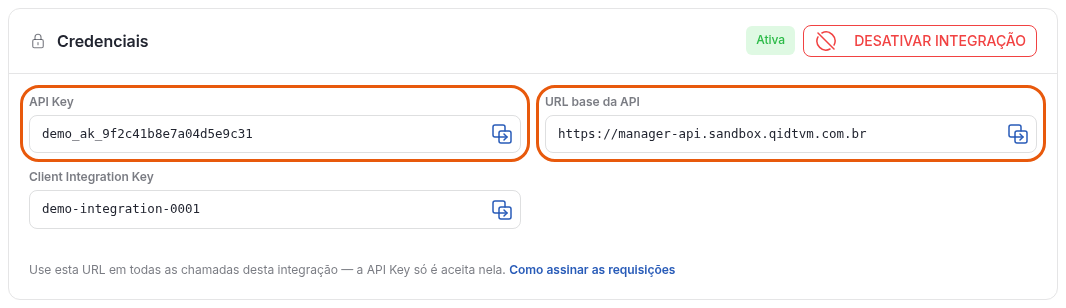
Copy the base URL straight from the portal: it is shown in the integration's Credenciais block, next to the API Key, already for the right profile and environment. See the image in step 3.
2. Install and import the libraries
pip install "python-jose[cryptography]" requests
from datetime import datetime, timezone
import json
from hashlib import md5

from jose import jwt
import requests
3. Provide the API key, the private key and the algorithm
api_key = "YOUR_API_KEY"

client_private_key = """-----BEGIN PRIVATE KEY-----
YOUR_PRIVATE_KEY
-----END PRIVATE KEY-----"""

algorithm = "RS256"  # your key's algorithm; see the table below
Where to find each value depends on how your integration was created:
| Value | Managers and consultants (portal) | Assignors, originators, investors and distributors |
|---|---|---|
api_key | In the portal, under Gestão de Acesso > Integração API (Access Management > API Integration): open the integration and copy the API Key field from the Credenciais (Credentials) block. | Sent by the QI integration team after the key exchange. |
client_private_key | The qi-integration-...-private-key.pem file downloaded when generating the pair in the portal, or the private key of the pair you generated yourself. | The private key of the pair you generated in the key exchange. |
algorithm | The one shown in the portal below the chosen algorithm: RS256 for RSA (portal default), ES256, ES384 or ES512 for EC P-256, P-384 or P-521. | ES512, for the EC P-521 key generated in the key exchange. |
Paste the entire content of the private key file, with the BEGIN and END lines — the header may be PRIVATE KEY or EC PRIVATE KEY, depending on the tool that generated the pair. The API key identifies the integration, and the signature with the private key proves the request is yours: treat both as credentials. The private key is never sent to QI. In Production, load the private key from a secrets vault or an environment variable — never leave it in the source code.
The portal walkthrough, from creating the integration to registering the public key, is in Portal Integration.
4. Define the request data
# Replace with the URL of your profile and environment (table in step 1).
base_url = "YOUR_PROFILE_BASE_URL"  # e.g.: "https://manager-api.sandbox.qidtvm.com.br"

method = "POST"
endpoint = "/authentication_test"
body = {"name": "QI Tech"}
The signature's uri field must be identical to the path sent in the request. If the endpoint takes query string parameters, they are also part of the signed URI — see Requests with a query string.
5. Build the signature content
timestamp = datetime.now(timezone.utc).strftime("%Y-%m-%dT%H:%M:%S")

dict_to_sign = {"timestamp": timestamp, "method": method, "uri": endpoint}
The timestamp follows the YYYY-MM-DDTHH:MM:SS format, with no time zone and no milliseconds, is always in UTC and is accepted with up to 10 minutes of difference from QI's clock. Generate a new one for each request and keep the server clock synchronized.
5.1. If there is a body, add the MD5
Requests with a body include the MD5 of the exact bytes that will be sent:
body_bytes = json.dumps(body).encode()

dict_to_sign["payload_md5"] = md5(body_bytes).hexdigest()
Send exactly these body_bytes in step 7. If the JSON is serialized again — with a different field order, spacing or accent encoding —, the MD5 no longer matches.
6. Sign the JWT
encoded_header_token = jwt.encode(
    claims=dict_to_sign,
    key=client_private_key,
    algorithm=algorithm,
    headers={"alg": algorithm, "typ": "JWT"},
)
The algorithm must belong to the key's family: RS* for RSA and ES* for EC. Otherwise, jwt.encode fails before the request is sent, with a not very descriptive JWSError — check the algorithm first.
7. Send the request
headers = {
    "API-CLIENT-KEY": api_key,
    "AUTHORIZATION": encoded_header_token,
    "Content-Type": "application/json",
}

resp = requests.post(url=f"{base_url}{endpoint}", headers=headers, data=body_bytes)
print(resp.status_code, resp.json())
The expected response is 200 with {"name": "QI Tech", "success": "Congrats!"}. The contract of GET and POST /authentication_test is in Test endpoints.
Authentication errors
The code of authentication errors ends with the same number on every host. The prefix indicates which host responded: MIT for manager-api, CIT for consultant-api and AIT for assignor-api. If the prefix is not your profile's, the base_url is wrong.
code suffix | Status | Error | What to check |
|---|---|---|---|
000007 | 401 | Missing header | Both headers, API-CLIENT-KEY and AUTHORIZATION, were sent. |
000008 | 401 | Invalid API key | The base_url is that of your profile and of the right environment, and the API key was copied without spaces. |
000009 | 400 | Inactive integration | The integration is active. Contact integracao.dtvm@qitech.com.br. |
000010 | 401 | Public key pending | The public key has already been registered on the integration. |
000011 | 401 | Invalid authentication | The JWT was signed with the private key that matches the registered public key. |
000012 | 401 | Incomplete signature | The JWT has the timestamp, method and uri fields. |
000013 | 401 | Invalid method | The signed method is the same as the request's, in uppercase. |
000014 | 401 | Expired signature | The timestamp is in UTC, was generated at request time and the server clock is synchronized. |
000015 | 401 | Invalid endpoint | The signed uri is identical to the path sent, including the query string and without the base_url. |
000016 | 401 | Invalid MD5 | The payload_md5 was computed over the same bytes sent in the body. |
000020 | 401 | Timestamp format | The timestamp is in the YYYY-MM-DDTHH:MM:SS format, with no time zone and no milliseconds. Only manager-api and consultant-api return this code: on assignor-api, a timestamp out of format comes back as a 500 error. |
Permission, route and service errors are in API errors.
Requests with a query string
Paginated or filtered endpoints take parameters in the query string — for example ?page=0&limit=20. In these cases, the query string is part of the signed URI.
The uri field must match the path sent in the request: same parameters, in the same order and with the same encoding. If the signed URI and the URI sent are not the same, the request is rejected with status 401:
{
  "title": "Invalid endpoint",
  "description": "Invalid endpoint.",
  "translation": "O endpoint é invalido",
  "code": "MIT000015"
}
Example
# base_url from step 4. This endpoint belongs to the manager (manager-api).
path = "/quota/fund_class/{fund_class_key}/investor_positions"
query_string = "page=0&limit=20"

# the query string is part of the signed uri
uri = f"{path}?{query_string}"

method = "GET"
timestamp = datetime.now(timezone.utc).strftime("%Y-%m-%dT%H:%M:%S")

dict_to_sign = {"timestamp": timestamp, "method": method, "uri": uri}

encoded_header_token = jwt.encode(
    claims=dict_to_sign,
    key=client_private_key,
    algorithm=algorithm,
    headers={"alg": algorithm, "typ": "JWT"},
)

headers = {"API-CLIENT-KEY": api_key, "AUTHORIZATION": encoded_header_token}

resp = requests.get(url=f"{base_url}{uri}", headers=headers)
print(resp.json())
Recommendations
- Build the query string and send the full URL. Avoid using the
requestsparamsargument together with an already signed URI: the HTTP client may reorder or re-encode the parameters and invalidate the signature. GETrequests usually have no body. In that case, do not send a body or thepayload_md5field.- Values with special characters (document punctuation, dates, spaces) must be signed in the final form in which they will be sent in the URL.