Configuring Integration IP Allowlist
QI Tech lets you restrict calls to your integration to a list of pre-authorized public IP addresses (or CIDR ranges). This filter is applied before signature validation: requests originating from IPs outside your active list are rejected with 403 Forbidden (GDF000029).
How to configure
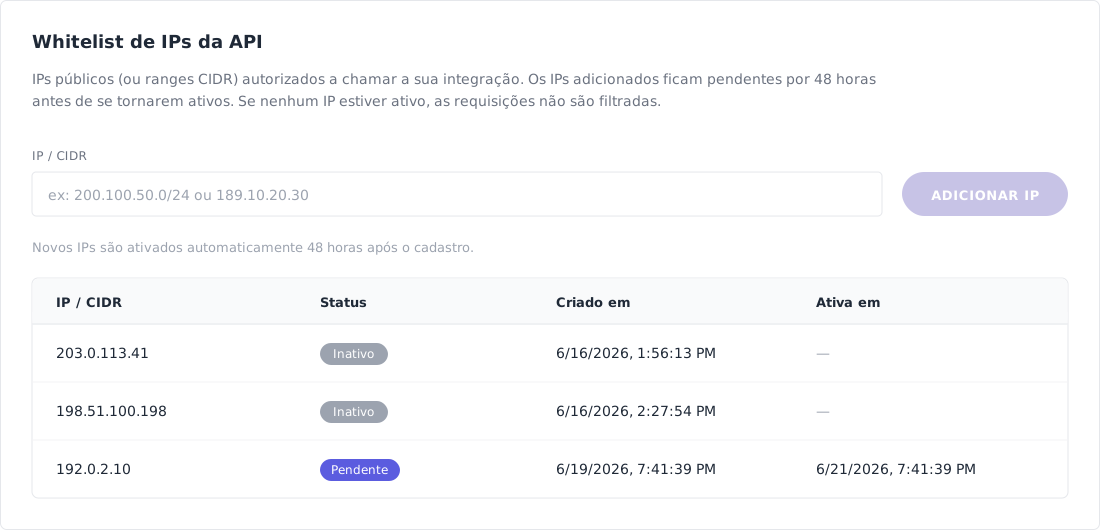
Log in to the QI Tech platform, click My Profile in the left sidebar, and open the Integration tab. Scroll to the "Whitelist de IPs da API" section and add one IP at a time in the "IP / CIDR" field, clicking "ADICIONAR IP" for each entry.
Accepted formats:
- Public IPv4 address (e.g.:
189.10.20.30) - IPv4 CIDR range with prefix
/24or larger (e.g.:200.100.50.0/24) - Public IPv6 address
- IPv6 CIDR range with prefix
/48or larger
Private/reserved ranges (10.0.0.0/8, 172.16.0.0/12, 192.168.0.0/16, 127.0.0.0/8, 169.254.0.0/16) are not accepted.
Activation window (48 hours)
For security reasons, every IP registered through the dashboard stays in Pending status for 48 hours before being activated automatically. During this period the IP is registered but does not authorize requests — whatever is currently in your active allowlist keeps working.
You will receive an email confirming the registration and another when the IP transitions to Active.
After 48 hours, the IP automatically moves to Active and starts being authorized to call the API.
Emergency activation
If you need to release an IP before the 48-hour window (e.g.: unplanned server migration, production incident), contact our support through the official channels and request manual activation with the following information:
- The registered
IP / CIDR - Your integration's
client_integration_key - The reason for urgency
Our operations team will perform the manual promotion and the IP will take effect immediately.
Common errors
| Code | Cause | Solution |
|---|---|---|
403 / GDF000029 | The request came from an IP that is not in Active status in your allowlist | Check on the Integration screen which IPs are active. If the IP you just registered is still Pending, wait for the 48 hours or request manual activation. |
| IP registration rejected | Invalid IP/CIDR, private range, or range too broad (prefix smaller than /24 for IPv4 or /48 for IPv6) | Use public addresses only and respect the minimum prefix sizes. |